TEZ ERP · ORDER MANAGEMENT

From the first customer requirement
to final delivery, collection and closure.

TEZ ERP connects every order with stock, purchasing, production, warehouse, dispatch and finance.

Capture, fulfil, dispatch and track every order through one connected process.
ONE ORDER.•EVERY ACTION.•NOTHING LEFT DISCONNECTED.
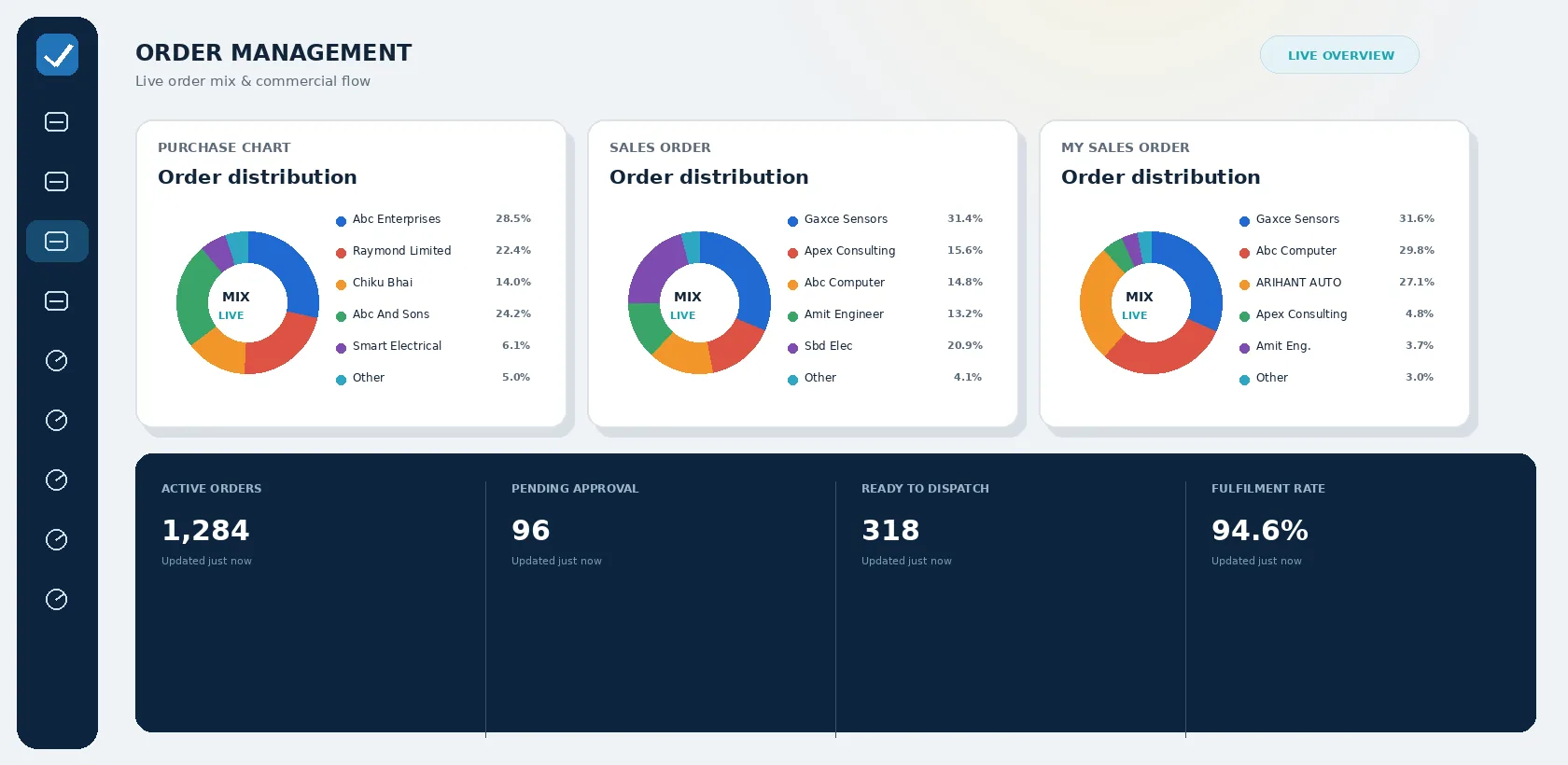
TEZ ERP order management dashboard showing purchase, sales and order distribution charts
OMNICHANNEL & SALES ORDERS PURCHASE ORDERS & SUPPLY STOCK AVAILABILITY & PRODUCTION PICKING, PACKING & DISPATCH BILLING & RECONCILIATION
ORDER MANAGEMENT IS MORE THAN ORDER ENTRY

Entering the order is the first step—not the final control.

A serious Order Management system must answer the hard operational and commercial questions behind every commitment:

  • Where did the order originate?
  • What exactly did we promise?
  • Has the commercial offer been approved?
  • Is the required stock available?
  • Is that stock already committed?
  • Can another branch fulfil it?
  • Must anything be purchased or produced?
  • Has the material passed quality control?
  • Has it been picked and packed?
  • Has it been invoiced and dispatched?
  • Has the customer received it?
  • Has payment been collected?
CONNECTED PROCESS CONTROL

TEZ keeps these answers connected to the original order.

No matter where the order begins, it enters one controlled process.

CAPTURE ORDERS FROM EVERY CHANNEL

One order system—irrespective of where demand begins.

Customer requirements may originate from different teams, platforms and commercial channels. TEZ can bring applicable orders into a common order-management process from:

CRM

Convert opportunities and accepted quotations into customer orders.

Agent Portal

Allow authorised agents to submit and track orders relevant to them.

Customer Portal

Allow customers to place requirements and access applicable order information.

B2B Orders

Receive distributor, dealer, institutional and business orders.

B2C E-Shop

Connect applicable online consumer orders with billing, stock and fulfilment.

Website & API

Accept orders from connected websites, applications and other authorised systems.

BOQ

Convert project or quantity requirements into commercial and fulfilment transactions.

Manual & Excel Entry

Enter an individual order directly or upload larger order datasets through Excel.

A COMPLETE CONNECTED WORKFLOW

Every commercial and operational action stays linked.

One workflow can branch according to how the order must be fulfilled, while the original requirement remains traceable across sales, procurement, and manufacturing.

CRM / Portal / Website / BOQ → Quotation → Sales Order → Commercial Approval → Stock, Credit & Fulfilment Check → Purchase / Production / Transfer → Proforma / Delivery Challan → Pick List & Packing List → Sales Invoice / POS Billing → E-Invoice & E-Way Bill → Dispatch & Delivery → Payment Gateway / Receipt / PDC → Bank Reconciliation
Indent / Sales Order / Requirement → Purchase Order Generation → Purchase Order Approval → Vendor Communication / Portal → Transit & Gate Inward → GRN → Quality Control (QC) → Put List / Stock Acceptance → Purchase Bill → Payment Approval → Payment / Banking API → Vendor Reconciliation
Sales Order / Forecast → Production Plan → Work Order → Multi-Process BOM → Material Indent / Stock Transfer → In-House Production / Job Work → Production Voucher → Finished-Goods Quality Control → Stock Availability for Fulfilment

One workflow can branch according to how the order must be fulfilled, while the original requirement remains traceable.

QUOTATION MANAGEMENT

Convert an opportunity into a controlled commercial offer.

Create quotations directly or from applicable CRM opportunities with full commercial and compliance context.

Maintain complete commercial quotation details:

  • Customer
  • Customer enquiry reference
  • Bill-to address
  • Ship-to address
  • Company
  • Branch
  • Department
  • Place or region
  • Sales executive or agent
  • Quotation date
  • Validity date
  • Item or service
  • Description
  • Quantity
  • Unit
  • Rate
  • Item-wise discount
  • Overall discount
  • GST and cess
  • Freight
  • Packing and forwarding
  • Additional commercial charges
  • Currency and exchange rate
  • Terms and conditions
  • Supporting documents
  • Narration

Select an item by its name, alias or UPC and automatically bring its description, rate, unit, HSN and tax information into the quotation.

QUOTATION CONTROL

Know what was quoted, what converted and what still requires follow-up.

Quotation list summaries provide leadership and sales executives live visibility across open commercial offers.

Quotation list summaries can show:

  • Total quotation value
  • Billed value
  • Unbilled value
  • Number of quotations
  • Customer
  • Sales executive
  • Region
  • Quotation date
  • Validity date
  • Amount
  • Conversion status

Filter, search and sort quotations by company, branch, department, region, customer group, agent, number, date, amount, item, quantity or status.

Quotation→Sales OrderorSales Invoice→Carried Forward Automatically

The selected information is carried forward instead of being entered again.

SALES ORDER MANAGEMENT

Record exactly what the customer ordered and what you committed to supply.

A Sales Order maintains the complete commercial, inventory and delivery context in one verified record.

Maintain complete commercial and fulfilment context:

  • Customer
  • Customer purchase order number
  • Customer order date
  • Bill-to address
  • Multiple ship-to addresses
  • GSTIN
  • State and place of supply
  • Company
  • Branch
  • Department
  • Sales executive or agent
  • Order date
  • Committed due date
  • Item
  • HSN
  • Description
  • Quantity
  • Default or alternate unit
  • Rate
  • Discount
  • Tax
  • Freight
  • Additional charges
  • Inclusive or exclusive tax
  • Currency & exchange rate
  • Terms and conditions
  • Supporting documents & narration

Customer, address, tax, agent and due-date information can be populated from the Customer Master. Item descriptions, rates and taxes populate from the Item Master or the last transaction.

FAST SALES ORDER ENTRY

Designed for people processing orders all day.

TEZ reduces repetitive entry through smart defaults, auto-lookups, and bulk utilities.

  • Automatic voucher numbering
  • Customer search by name or alias
  • Item search by name, alias or UPC
  • Customer defaults
  • Multiple saved addresses
  • Default sales rates
  • Last-customer transaction rates
  • Customer-specific pricing
  • Automatic HSN and tax
  • Default and alternate units
  • Barcode-driven item selection
  • Copy previous order
  • Copy discounts across item lines
  • Copy tax rates across item lines
  • Keyboard shortcuts
  • Save and continue
  • Excel upload
  • Single-entry upload
  • User-defined fields
  • User-defined line information
  • User-defined accounting charges

Advanced functionality remains available without making routine entry unnecessarily complicated.

CONFIGURABLE SALES ORDER FORMS

Adapt the order to the information your business requires.

TEZ supports configuration at multiple commercial and operational levels.

User-Defined Fields

Add order-level information such as project, delivery instruction, tender reference or commercial classification.

User-Defined Item Fields

Add line-level information such as specification, colour, size, drawing number or customer part code.

User-Defined Accounts

Add charges such as packing, forwarding, delivery, insurance or handling and post them to relevant ledgers.

Batch & Serial Controls

Enable batch or serial-number information where the product requires strict unit traceability.

Create different Sales Order print templates using configurable HTML formats.

SALES ORDER APPROVAL

An unapproved order should not quietly become a commercial commitment.

TEZ clearly distinguishes approved and unapproved Sales Orders across the organization.

Configurable controls prevent an unapproved order from being:

  • Printed
  • Emailed
  • Converted into a Sales Invoice
  • Converted into a Purchase Order
  • Converted into a Delivery Challan
  • Converted into a Proforma Invoice
  • Converted into a Work Order

This is stronger than simply placing an approval label on the order. Approval determines whether the order can move forward.

COMMERCIAL APPROVAL RULES

Direct the exceptional order to the right authority.

Approval conditions can be designed around multi-dimensional commercial and operational thresholds:

  • Order value
  • Customer
  • Customer group
  • Discount
  • Selling rate
  • Margin
  • Credit limit
  • Overdue receivables
  • Payment terms
  • Item
  • Quantity
  • Stock shortage
  • Branch
  • Department
  • Sales executive
  • Delivery commitment

Routine orders continue quickly. Commercial exceptions are held for appropriate review.

STOCK-AWARE ORDER MANAGEMENT

Physical stock is not always available stock.

An item may physically exist in the godown but already be committed against another approved customer order.

TEZ considers live demand and supply information:

  • Current stock
  • Branch-wise stock
  • Department-wise stock
  • Pending Sales Orders
  • Proforma Invoice commitments
  • Delivery Challans
  • Purchase Orders in the pipeline
  • Material in transit
  • Expected GRNs
  • Stock available at another location
  • Production in progress

Configurable negative-stock controls consider pending orders so users do not repeatedly promise the same quantity. Know the stock. Know commitments. Know what remains available.

SALES ORDER SUMMARY

See which orders can be executed before opening every order.

TEZ Sales Order Summary brings together live execution readiness across the order book.

  • Pending customer orders
  • Ordered items
  • Ordered quantity
  • Stock in hand
  • Proforma Invoice commitments
  • Purchase Orders in the pipeline
  • Pending quantity
  • Order date
  • Due date
  • Order value
  • Fulfilment readiness

Orders that can be fulfilled completely are highlighted distinctly. Orders that can be fulfilled only partially are separately identified. Sort by order number, order date, due date or order value.

When an invoice is generated, the availability position refreshes immediately. A live fulfilment decision—not a static order register.

ONE-CLICK ORDER FULFILMENT

Move from decision to action immediately.

From the Sales Order, authorised users create downstream documents without re-keying data:

Purchase Order

Create a back-to-back Purchase Order for items required specifically for the Sales Order.

Proforma Invoice

Issue a commercial document for advance collection before final billing.

Delivery Challan

Send material where site installation, demonstration or billing takes place later.

Sales Invoice

Convert pending Sales Order quantities into a compliant tax invoice.

Work Order

Create manufacturing instructions for products that must be produced.

Pick List

Generate warehouse instructions for precise material selection.

The new document is prefilled with relevant information from the Sales Order.

PENDING-QUANTITY CONVERSION

Carry forward what remains—not what was originally ordered.

When a partially processed Sales Order is converted, TEZ brings pending items and quantities into the next document.

  • Ordered quantity
  • Converted quantity
  • Delivered quantity
  • Invoiced quantity
  • Cancelled or closed quantity
  • Pending quantity

This protects the user from accidentally processing the full original quantity again. The Sales Order closes only to the extent processed or manually authorised.

ORDER STATUS

Simple statuses that communicate the real position.

Separate commercial approval from fulfilment progression.

Pending

The order has been approved but has not yet been processed downstream.

Partial

Only part of the order has been fulfilled or invoiced; balances remain open.

Completed

The complete ordered quantity has been dispatched and invoiced.

Manually Closed

The remaining quantity is no longer required and has been closed by an authorised user.

A partially fulfilled order does not disappear merely because one invoice was raised.

ORDER ADJUSTMENT VIEW

Open one order and see every document created against it.

The Adjustment view shows every document linked to the Sales Order:

  • Proforma Invoices
  • Delivery Challans
  • Sales Invoices
  • Purchase Orders
  • Work Orders
  • Returns
  • Credit Notes
  • Other adjustments
Order→Linked Document→Qty Processed→Qty Pending

This explains exactly how an order reached its current status.

PROFORMA INVOICE

Confirm commercial value without losing the future billing trail.

Create a Proforma Invoice from the Sales Order carrying forward customer, addresses, items, quantities, rates, taxes, freight, terms and attachments.

Proforma Invoices can be:

  • Printed or generated as PDF
  • Emailed or shared through WhatsApp
  • Used to print a Pick List
  • Converted into a Sales Invoice
  • Converted into a Delivery Challan
  • Tracked as pending, partial or completed

The list clearly distinguishes billed, unbilled and total commercial value.

DELIVERY CHALLAN MANAGEMENT

Track goods delivered before final billing.

TEZ supports Delivery Challans for businesses that supply, install, demonstrate, process or move goods before raising the final tax invoice.

Track complete dispatch and challan parameters:

  • Customer
  • Delivery address
  • Challan date
  • Item
  • Quantity
  • Batch or serial number
  • Transporter
  • Vehicle
  • LR number and date
  • Boxes
  • Weight
  • Freight
  • Pending quantity
  • Billed quantity
  • Unbilled quantity

One or more Delivery Challans can be consolidated into a single Sales Invoice.

STOCK LYING WITH THE CUSTOMER

Physical location and accounting ownership are not always the same.

A Delivery Challan moves goods physically to the customer without transferring ownership through an invoice.

TEZ retains this crucial accounting distinction: goods remain part of the organisation’s closing stock while identified as physically lying at the customer site.

Delivery Challans are considered during negative-stock checks while billing, according to configuration.

Gives the business both views: Stock as an accounting asset • Stock by its physical location.

DELIVERY CHALLAN CONTROLS

Control quantity, compliance and final billing.

Ensure delivered goods do not slip through without proper financial invoicing.

  • Restrict quantity beyond originating order
  • Generate Sales Invoice
  • Generate GRN where applicable
  • Generate Debit Note for damaged material
  • Generate E-Way Bill
  • Print Packing List
  • Print configurable templates
  • Track pending, partial and completed status
  • Review linked adjustments
  • Identify billed and unbilled challans
  • Export and report challan data

The system keeps delivered-but-unbilled material visible until financial closure.

SALES INVOICE & POS BILLING

Convert fulfilment into compliant billing.

Sales Orders, Proforma Invoices and Delivery Challans flow into Sales Invoices without repetitive data entry. Counter-based POS billing is also fully supported.

The Sales Invoice connects the order directly with:

  • Stock movement
  • Customer receivable
  • Revenue accounting
  • GST
  • E-Invoicing
  • E-Way Bill
  • Dispatch
  • Payment gateway
  • Receipt
  • Credit Note
  • Bank reconciliation

Commercial, inventory, taxation and accounting records originate from the same single transaction.

GST & ORDER COMPLIANCE

Compliance begins with correct order and invoice information.

Customer GSTIN, branch state, place of supply, HSN, tax rate and taxable value flow seamlessly into the commercial transaction.

  • CGST, SGST & IGST
  • Cess
  • Inclusive and exclusive tax
  • HSN summary
  • E-Invoicing (IRN generation)
  • E-Way Bills
  • GSTR-1 reporting
  • GSTR-3B reporting
  • GSTR-2A/2B reconciliation
  • Credit and Debit Note impact

The system determines interstate or intrastate tax treatment automatically from transaction parameters.

DISPATCH MANAGEMENT

Billing should not be the end of order visibility.

Once the sales invoice is prepared, it immediately appears in Dispatch Management for logistics execution.

Record and update transit metadata:

  • Transporter
  • LR number
  • LR date
  • Vehicle number
  • Number of boxes
  • Weight
  • Freight
  • Company voucher number
  • Dispatch date
  • Delivery status
  • Received date

The transaction moves from open to dispatched when info is saved. Delivery completion is recorded upon customer receipt.

BULK DISPATCH & CUSTOMER COMMUNICATION

Process high-volume dispatch without high-volume repetitive work.

Accelerate dispatch operations across multiple vehicles, transporters and consignees.

  • Dispatching multiple invoices together
  • Grouping invoices by transporter & vehicle
  • Bulk dispatch updates through Excel
  • Automatic customer email notifications
  • Dispatch status tracking
  • Delivery confirmation tracking

Communicate order updates through Email, SMS, WhatsApp and Customer Portal.

The customer remains informed without requiring a manual phone call for every dispatch.

PICK LIST

Tell the warehouse exactly what to pick.

Generate a Pick List directly from applicable Sales Orders or Proforma Invoices.

  • Customer
  • Order reference
  • Item
  • Quantity
  • Batch
  • Serial number
  • Branch
  • Department
  • Godown
  • Bin or rack
  • Required date
  • Special instructions

The warehouse sees its operational requirement clearly without needing to interpret complex commercial pricing documents.

PACKING MANAGEMENT

Track what went into every carton.

TEZ Packing Management maintains granular carton-level packing records with batch and serial integrity.

  • Customer
  • Company & Branch
  • Department
  • Order number
  • Carton number
  • Packing date
  • Item
  • Batch number
  • Quantity
  • Rate & Amount
  • Supporting documents

Filter entries by Order, Item, Carton, Company, Branch, Department or Date. Generate barcodes against packed material.

Batch information preserves end-to-end traceability between stock, packing, and dispatch.

GATE PASS MANAGEMENT

Connect physical entry and exit with the ERP document.

Record vehicle and material movement at the physical factory or warehouse gate.

Vehicle Inward & Outward

Maintain arrival and exit timestamps for transport vehicles entering the premises.

Material Inward

Create inward records against Purchase Orders and Sales Returns; seamlessly convert into GRN.

Material Outward

Create outward gate passes against pending Sales Invoices, Delivery Challans, and Debit Notes.

Connected Security

Security and stores teams select the originating ERP transaction rather than keeping disconnected logbooks.

INDENT MANAGEMENT

Convert an internal requirement into an authorised fulfilment action.

Departments, branches, stores and production teams raise Indents for operational requirements.

Raise indents for:

  • Production requirements
  • Maintenance
  • Internal consumption
  • Branch replenishment
  • Customer order fulfilment
  • Operational supplies

Maintain requesting company/branch/department, destination branch/department, item, quantity, date, purpose and remarks.

An Indent records demand accurately without prematurely changing physical stock.

INDENT-TO-ACTION

Buy it, transfer it, issue it or produce it.

From an approved Indent, authorised users immediately trigger appropriate downstream transactions:

Stock Transfer

Fulfil the requirement from stock already available in another branch or godown.

Purchase Order

Procure the required material from an approved vendor.

Purchase Invoice

Record direct procurement where material and invoice arrive together.

Sales Invoice

Bill internally requested or supplied material where commercial recovery applies.

The Indent retains pending, partial and completed quantities and shows all transactions created against it.

STOCK TRANSFER & ACCEPTANCE

Stock should leave one location before it enters another.

TEZ enforces dual-handshake stock movement between Companies, Branches, Godowns, Stores and Departments.

Issued (Origin)→In Transit (Visibility)→Stock Accepted (Destination)

The issuing location records the stock transfer. The destination records Stock Acceptance when material is physically received. During transit, material remains visible as stock in transit.

Each stage remains separately identifiable and accountable.

GOODS RELEASE

Control when material is authorised to leave custody.

Goods Release acts as an operational gate before material moves into transfer, production, job work or customer fulfilment.

Provides an essential checkpoint of authorisation between the administrative requirement and physical warehouse release.

Prevents premature dispatch or unapproved factory floor material consumption.

PURCHASE ORDER GENERATION

Turn calculated requirements into vendor orders.

Purchase requirements originate directly from business demand:

  • Pending Sales Orders
  • Approved Indents
  • Production BOM shortages
  • Reorder level triggers
  • Stock shortage alerts
  • Back-to-back customer orders
  • Direct procurement

TEZ prefills Purchase Orders from the originating requirement, eliminating duplicate entry and preserving traceability.

PURCHASE ORDER MANAGEMENT

Control every vendor commitment.

Maintain complete vendor procurement agreements and commercial terms:

  • Vendor & vendor reference
  • Company, Branch & Department
  • PO date & expected delivery date
  • Delivery location
  • Item & description
  • Quantity & unit
  • Rate & discount
  • Tax, freight & additional charges
  • Currency & exchange rate
  • Payment & delivery terms
  • Terms and conditions
  • Attachments

Purchase Orders can be printed, converted to PDF, emailed, shared through WhatsApp, uploaded via Excel, and tracked by status.

PURCHASE ORDER APPROVAL

Do not let an unapproved purchase commitment move forward.

Enforce governance before procurement commitments reach vendors.

Configurable restrictions prevent an unapproved PO from being:

  • Printed
  • Emailed
  • Converted into a Purchase Invoice
  • Linked to a Sales Order
  • Converted into a GRN

Control whether purchased quantities may exceed original requested indent quantities.

Only approved procurement results in vendor communication, receipt or financial liability.

VENDOR PORTAL

Give vendors controlled access to the information relevant to them.

Enable direct collaboration with external suppliers without compromising internal security:

  • Purchase Order access
  • Order acknowledgement
  • Expected delivery confirmation
  • Dispatch & consignment details
  • Supporting documents & test certificates
  • Pending supply visibility
  • Commercial messaging
  • Payment status visibility

Vendors participate directly in the supply workflow without access to internal ERP records.

PURCHASE ORDER SUMMARY

Calculate purchasing from demand, stock and incoming supply.

The PO Summary brings together complete net requirement variables:

  • Pending Indents
  • Pending Proforma Invoices
  • Pending Sales Orders
  • Current stock in hand
  • Pending Purchase Orders
  • Material in transit
  • Pipeline quantity
  • Required purchase quantity
  • Previous vendor
  • Last purchase rate

Click the required quantity to begin creating a Purchase Order prefilled with details from the last purchase.

Know what is required. Know what is already coming. Buy only the balance.

TRANSIT MANAGEMENT

Track ordered material before it reaches stock.

Maintain live visibility into goods travelling between vendor, branch, warehouse or processing unit.

  • Vendor or party
  • Purchase Order reference
  • Origin & Destination
  • Dispatch date & expected date
  • Item & quantity
  • Transporter & vehicle number
  • LR number & documents
  • Receipt status

Pending POs flow into Transit Management. Upon arrival, related GRNs or Purchase Invoices are generated with complete audit trails.

GOODS RECEIPT NOTE

Record what physically arrived without assuming that it has been accepted or billed.

GRN captures raw physical arrival across various inward sources:

  • Against a Purchase Order
  • Against a vendor Delivery Challan
  • Before receiving the Purchase Bill
  • From external Job Work
  • Through Gate Pass Inward
  • Through Transit transactions

Capture vendor, PO, challan, arrival date, ordered vs received quantity, batch, serial, expiry, transporter, vehicle, LR, boxes and freight.

The GRN remains distinct from accepted usable stock and financial bills.

THREE DISTINCT RECEIPT EVENTS

Arrival, acceptance and billing are not the same event.

TEZ strictly segregates inward stages to safeguard financial and inventory integrity.

Material Arrived

Vehicle and goods reached the premises and passed gate entry.

Inspected & Accepted

Quantity passed QC inspection and is released into usable inventory.

Vendor Bill Recorded

Vendor invoice verified against PO and GRN, posting financially to AP.

Identifies: Material awaiting QC • Material received not accepted • Material accepted not billed • Billed with qty variance • Rejected awaiting Debit Note.

GRN QUALITY CONTROL

Do not allow unverified inward material to move silently into the next stage.

Record Quality Control readings directly against the GRN before stock release.

TEZ configurable policies restrict:

  • GRN printing until mandatory QC readings are completed
  • Purchase Invoice generation until QC passes
  • Delivery Challan generation until QC passes

Ensures the next document cannot be created merely because material physically landed at the loading bay. QC reports can be printed for compliance.

GRN QUANTITY CONTROL

Decide whether excess receipt is allowed.

Control whether received quantity may exceed Purchase Order quantity.

  • Excess receipt permitted within tolerance %
  • Excess receipt held for supervisory review
  • GRN quantity strictly restricted to PO balance

Prevents unplanned excess inventory accumulation and incorrect vendor over-billing.

GRN ACTIONS

Turn receipt into the correct next transaction.

From the GRN, authorised users trigger immediate downstream operations:

  • Print Put List
  • Print item barcode labels
  • Add QC inspection readings
  • Generate QC report
  • Create Purchase Invoice
  • Create Credit Note for defective/short material
  • Create Delivery Challan
  • Create Stock Transfer
  • Review linked adjustments
  • Close remaining quantity
  • Export or upload data
  • Track pending, partial & completed status

Related documents clearly document how the GRN was processed.

PUT LIST

Move accepted material to the correct storage location.

Generate a Put List to direct inward material systematically from unloading to storage racks.

  • Originating GRN
  • Item & description
  • Batch number
  • Serial number
  • Accepted quantity
  • Branch & Department
  • Target Godown
  • Target Bin or Rack
  • Pending put-away quantity

Receiving and storage become connected, trackable steps instead of disconnected manual notes.

BARCODE-ENABLED RECEIPT & PACKING

Scan where manual identification creates delay.

Deploy barcodes to accelerate throughput and eliminate human error in high-volume operations.

  • Identifying incoming shipments
  • Printing barcode labels from GRN
  • Batch and serial number tracking
  • Put-away bin verification
  • Picking verification
  • Packing carton verification
  • Physical stock audit scanning
  • High-speed counter billing

Reduces repetitive typing and wrong item dispatches in fast-paced warehouses.

PURCHASE BILL

Connect vendor billing with the order and receipt behind it.

Create Purchase Bills from Purchase Orders or GRNs carrying forward pending quantities automatically.

Verify multi-way commercial match:

  • Purchase Order quantity
  • GRN received quantity
  • Accepted quantity
  • Rejected quantity
  • Purchase Bill quantity
  • Purchase Order agreed rate
  • Billed invoice rate
  • Pending quantity
  • Pending bill value

The Purchase Bill posts the vendor accounts payable liability and updates inventory valuation and tax ledgers.

PAYMENT REMARKS & PAYMENT APPROVAL

Keep commercial payment instructions with the liability.

Maintain payment remarks and route disbursements through structured approval matrices before release.

  • Vendor profile
  • Purchase Order reference
  • Purchase Bill liability
  • Due date
  • Amount payable
  • Debit Notes deduction
  • Advances adjusted
  • Payment remarks & instructions
  • Approval tier status
  • Bank account or payment method

Only authorised disbursements proceed to the final banking stage.

PAYMENT & BANKING API

Complete the procurement cycle without breaking the trail.

Approved vendor payouts flow seamlessly into banking payment rails and automated API integrations.

  • Vendor master
  • Purchase Bill
  • Outstanding invoice reference
  • Company & Branch
  • Bank account
  • Authorisation log
  • Payment date
  • Bank reconciliation status

Procurement, accounts payable and corporate banking share one unified liability and payment trail.

IMPORT ORDER MANAGEMENT

Manage imported purchases beyond the Purchase Order.

TEZ Bill of Entry functionality manages foreign procurement, customs compliance, and complex landing costing.

  • Foreign vendor & origin country
  • Port of loading & port code
  • Customs House Agent (CHA)
  • Forwarder details
  • Packages & gross weight
  • Purchase Order & supplier invoice
  • Bill of Lading
  • Authorised Dealer (AD) code
  • Currency & exchange rate
  • Item & HSN
  • Assessable value
  • Freight, insurance & charges
DUTIES & LANDED COST

Know the complete cost of imported material.

Capture every import duty and statutory surcharge to calculate actual inventory cost:

  • Basic Customs Duty (BCD)
  • Social Welfare Surcharge (SWS)
  • IGST on Imports
  • Additional Customs Duty
  • Education Cess
  • Special Additional Duty (SAD)
  • Countervailing Duty (CVD)
  • Other statutory cess
  • Ocean/Air Freight
  • Marine Insurance
  • CHA & clearing expenses
  • Exchange rate fluctuation impact

Cost decisions reflect real landed cost—not merely the foreign supplier’s invoice price.

DEBIT NOTES & CREDIT NOTES

Keep commercial exceptions linked to the underlying order.

Generate adjustments with full audit links to the originating sales or purchase voucher:

  • Purchase returns
  • Sales returns
  • Damaged goods in transit
  • Rejected inward material
  • Short supply adjustments
  • Excess billing corrections
  • Rate differences
  • Quantity differences
  • Customer warranty returns
  • Vendor debit claims

Debit and Credit Notes remain irrevocably linked to the transaction responsible for the commercial discrepancy.

PAYMENT GATEWAY & RECEIPTS

Connect the customer order with the money collected.

Customer invoices connect directly with multiple collection methods:

  • Payment gateway integration
  • Cash counter receipts
  • Bank NEFT/RTGS/IMPS receipts
  • Advance customer receipts
  • Part payments
  • On-account adjustments
  • Bill-wise collection allocation
  • Credit Note offsets
  • Post-dated cheques (PDC)

The customer order journey stays visible all the way through billing, collection, and bank deposit.

POST-DATED CHEQUE MANAGEMENT

Record future collections and payments before they reach the bank.

Track incoming and outgoing post-dated cheques to maintain accurate cash-flow forecasts.

  • Customer or vendor account
  • Company, Branch & Department
  • Cheque number & date
  • Cheque amount
  • Drawn-on bank & branch
  • Remarks & linked vouchers

Empowers collection planning, vendor payment scheduling, liquidity visibility, and automatic receipt generation on clearance.

BANK RECONCILIATION

Complete the trail from order to cleared money.

Customer receipts and vendor disbursements reconcile automatically against live bank activity.

  • ERP book entry
  • Bank statement transaction
  • Value clearance date
  • Unmatched receipts
  • Unmatched payments
  • Bank charges & fees
  • Interest credits/debits
  • Timing differences

The order-to-cash and procure-to-pay lifecycles conclude in fully reconciled financial ledgers.

ORDER-LINKED PRODUCTION

If the item is unavailable, decide whether to buy it, transfer it or make it.

A Sales Order for a manufactured item contributes directly to production planning without manual handoffs.

The Sales Order flows immediately into:

  • Production Plan
  • Work Order generation
  • BOM explosion
  • Material Indents
  • Stock Transfers
  • In-house manufacturing
  • Job Work processing
  • Production Vouchers
  • Finished-goods QC

Production remains linked to actual customer demand instead of being managed on separate spreadsheets.

PRODUCTION PLANNING AGAINST ORDERS

Plan what must be made from what is already promised.

Production scheduling dynamically evaluates shop-floor realities against customer commitments:

  • Pending Sales Orders
  • Existing open Work Orders
  • Active shop-floor production
  • Finished-goods stock on hand
  • Raw-material availability
  • BOM component requirements
  • Production due dates

Helps production planners distinguish immediate committed customer demand from general stock-building runs.

WORK ORDERS

Convert the production requirement into authorised work.

A Work Order issues authorised execution instructions to factory teams.

  • Finished or semi-finished item
  • Required batch quantity
  • Bill of Materials (BOM)
  • Production routing sequence
  • Process stages
  • Machine & workstation
  • Production department
  • Raw-material requisition
  • Planned start & completion date
  • Responsible team & supervisor

From the Work Order, teams generate Material Indents, Stock Transfers, and Production Vouchers until the order is complete.

MULTI-PROCESS BOM

Track production through every required operation.

Where a product passes through sequential operations, TEZ maintains stage-wise integrity:

  • Process sequence order
  • Input raw material / WIP
  • Output yield quantity
  • Machine & tooling assignment
  • Labour & energy resource
  • Departmental routing
  • Process scrap & loss
  • Completed quantity per stage
  • Pending quantity per stage
  • In-process QC checkpoints

Completion of an initial stage does not incorrectly assume completion of the entire product route.

JOB WORK

Control material sent outside for processing.

TEZ Job Work maintains tight governance over external sub-contractors:

  • Job worker identity
  • Material issued & challan
  • Quantity issued
  • Stock lying with job worker
  • Expected finished item
  • Expected return date
  • GRN upon inward return
  • Received quantity
  • Pending balance with vendor
  • Conversion loss tracking

Track whether Job Work is pending, billed, closed or completed with complete regulatory compliance.

PRODUCTION VOUCHER & FINISHED-GOODS QC

Record what was consumed, what was produced and what passed inspection.

Production Vouchers accurately capture raw-material consumption and finished output yields.

Finished-Goods Quality Control verifies output meets all required technical specifications before releasing it for customer fulfilment.

Material Consumed→Production Voucher→FG QC Check→Available in SO Summary

Accepted manufactured stock flows back into the Sales Order Summary as executable inventory.

PHYSICAL INVENTORY & STOCK ADJUSTMENTS

Order fulfilment depends on the stock actually available.

Reconcile physical warehouse stock counts against ERP ledger balances.

  • Stock as per system
  • Stock physically counted
  • Missing / shortage quantity
  • Excess / surplus quantity
  • Approval reason code
  • Audit ledger adjustments

Controlled adjustments correct approved discrepancies while retaining complete reason trails. Updates immediately reflect in fulfilment decisions.

STOCK & ORDER AGEING

Time matters for both inventory and commitments.

Identify slow-moving stock, overdue commitments, and bottlenecked documentation:

  • Inventory stock ageing
  • Pending Sales Order ageing
  • Purchase Order ageing
  • Unbilled Delivery Challan ageing
  • GRN ageing awaiting bill/QC
  • Dispatch transit ageing
  • Receivable ageing
  • Payable ageing

Ageing reports pinpoint documents and stock that have remained unacted upon beyond acceptable business thresholds.

ACTION-ORIENTED ORDER REPORTING

A report should tell you what requires attention now.

Act while the order, delivery, or collection can still be protected.

Sales Exceptions

Orders awaiting approval • Overdue orders • Stock shortages • Orders needing procurement • Orders needing production • Margin exceptions.

Procurement Exceptions

Unconverted Indents • Unapproved POs • POs overdue • Delayed transit • Excess/short receipt • GRNs awaiting QC • Unbilled GRNs.

Fulfilment Exceptions

Ready not picked • Picked not packed • Packed not dispatched • Challans unbilled • Invoices undispatched • Dispatches unconfirmed.

Financial Exceptions

Overdue invoices • Unadjusted receipts • PDCs approaching due date • Payments awaiting approval • Unreconciled bank entries.

SALES ORDER REPORTS

Every order from every useful perspective.

Comprehensive operational, commercial, and executive reporting:

  • Sales Order Summary
  • Pending Sales Orders
  • Approved vs Unapproved Orders
  • Billed vs Unbilled Orders
  • Partial Orders
  • Completed Orders
  • Overdue Orders
  • Due-Date Schedule
  • Fulfilment Readiness
  • Stock Shortage Against Orders
  • Item-Wise Pending Orders
  • Customer-Wise Orders
  • Customer Group-Wise Orders
  • Agent-Wise Orders
  • Region-Wise Orders
  • Branch & Department Orders
  • Order Value Analysis
  • Order-to-PI Analysis
  • Order-to-Challan Analysis
  • Order-to-Invoice Analysis
  • Order-to-Purchase Analysis
  • Order-to-Production Analysis
  • Order Cycle-Time Analysis
PROCUREMENT REPORTS

Know what must be purchased and what remains unresolved.

End-to-end procurement and vendor performance metrics:

  • Purchase Order Summary
  • Open Purchase Orders
  • Approved & Unapproved POs
  • Pending PO Quantity
  • Overdue Purchase Orders
  • Item-Wise Pending Purchases
  • Vendor-Wise Purchase Orders
  • Indent-to-PO Analysis
  • Sales Order-to-PO Analysis
  • PO-to-Transit Analysis
  • PO-to-GRN Analysis
  • GRN-to-Purchase Bill Analysis
  • Received but Unbilled Material
  • QC-Pending GRNs
  • Rejected Material Report
  • Excess & Short Receipt
  • Vendor Delivery Performance
  • Purchase Rate Variance
  • Import BOE & Landed Cost
WAREHOUSE & DISPATCH REPORTS

Give stores and logistics their own operating workspace.

Dedicated logistical and warehouse execution analysis:

  • Pending Pick List
  • Order-Wise Picking
  • Pending Packing
  • Carton-Wise Packing
  • Batch-Wise Packing
  • Pending Put List
  • Awaiting Stock Acceptance
  • Stock in Transit
  • Stock with Customer (Challan)
  • Stock with Job Worker
  • Open Dispatches
  • Transporter-Wise Dispatch
  • Vehicle-Wise Dispatch
  • Undelivered Dispatches
  • Delivery Confirmation Pending
  • Gate Inward / Outward Logs
  • Return & Replacement Status
DASHBOARDS FOR EVERY ROLE

One system. Different operating priorities.

Role-specific consoles displaying live operational KPIs:

Sales

New orders, pending quotes, orders due today, credit exceptions, conversion rates, executive value.

Procurement

Required purchase quantity, unconverted indents, pending PO approvals, vendor delays, transit status.

Warehouse & Production

Ready to pick, pending packing, put-away queues, pending Work Orders, process completion, FG QC.

Finance & Management

Unbilled challans, unbilled GRNs, receivables, PDCs, total order book, executable value, order cycle time.

Every tile opens directly into the underlying transactions behind the KPI number.

CONFIGURABLE REPORTING

Build the view your role requires.

Tailor filters, columns, sorting, and layouts to match your workflow.

Filter by any operational dimension:

  • Company
  • Branch
  • Department
  • Customer
  • Customer Group
  • Vendor
  • Region Hierarchy
  • Agent
  • Item
  • Brand
  • Voucher Number
  • Due Date
  • Quantity
  • Status & Dispatch Status

Add or remove columns, rename headers, pin preferred layouts, save frequent views, export to Excel, and schedule automated email alerts with strict role-based access.

DOCUMENT MANAGEMENT

Keep the evidence with the transaction.

Attach supporting evidence directly to ERP vouchers to eliminate paper chasing:

  • Customer enquiries & POs
  • Quotations & proposals
  • Technical specifications
  • Engineering drawings
  • Vendor quotations & POs
  • Delivery Challans
  • GRN & QC test reports
  • Bill of Entry & Bill of Lading
  • Transport LR & packing lists
  • Tax Invoices & receipts

Users reviewing the order access evidence directly without searching emails or paper binders.

BUSINESS AUTOMATION

Let routine transactions move without routine chasing.

Configure automated triggers across your supply chain:

  • Order acknowledgement triggers
  • Approval routing escalations
  • Customer & vendor notifications
  • Order due-date warnings
  • Stock shortage alerts
  • PO delay notices
  • Dispatch notifications
  • Delivery confirmations
  • Payment & PDC reminders
  • Automated scheduled reports

Delivered automatically via Email, SMS, WhatsApp, Chatbot, Transaction Bot, Portals, and REST APIs.

COMPLETE TRACEABILITY

Follow the order from demand to money.

Start with any order and traverse the connected operational chain:

Source→Commercial→Availability→Warehouse→Compliance→Delivery→Finance→Analysis

CRM → Quotation & SO → Stock / PO / Production → Pick, Pack, Put → GST & E-Way → Challan, Gate, Dispatch → Invoice, Receipt, Bank Recon → Profitability.

A summary is useful. A traceable summary is significantly more powerful.

WHAT CAN YOUR TEAM ANSWER IN TEZ?

Right now.

Instant clarity across 28 fundamental operational questions:

  • Where did this order originate?
  • Has it been approved?
  • What did we promise the customer?
  • What is the committed delivery date?
  • Can we fulfil it completely?
  • Can we fulfil part of it?
  • What stock is already committed?
  • Which branch holds required material?
  • Should we transfer, purchase or produce?
  • Has an Indent been raised?
  • Has the Purchase Order been approved?
  • Is material in transit?
  • Has it reached the gate?
  • Has the GRN been made?
  • Has QC been completed?
  • Has material been accepted into stock?
  • Has it been put into the correct bin?
  • Has customer order been picked & packed?
  • Which carton contains the product?
  • Has the invoice been raised?
  • Has the E-Way Bill been generated?
  • Has it been dispatched?
  • Has the customer received it?
  • Has payment been collected?
  • What quantity remains pending?
  • Which document changed the status?
  • Why is this order still open?

TEZ keeps every single answer inside the connected order record.

SIMPLE TO USE. DIFFICULT TO LOSE CONTROL.

The business may be complex. The next action should remain simple.

TEZ brings together every stage of your order lifecycle into one cohesive, modern environment:

  • CRM
  • Quotations
  • Portals
  • B2B/B2C Orders
  • Sales Orders
  • Purchase Orders
  • Proforma Invoices
  • Delivery Challans
  • Stock Commitments
  • Indents
  • Stock Transfers
  • Acceptance
  • Production Planning
  • Work Orders
  • Multi-Process BOM
  • Job Work
  • GRNs
  • QC
  • Put Lists
  • Pick Lists
  • Packing
  • Gate Pass
  • Dispatch
  • GST & E-Invoicing
  • BOE
  • Receipts & Payments
  • PDC & Bank Reconciliation
  • Alerts & Automation

The simplest route from customer demand to delivery and money.

TEZ ERP ORDER MANAGEMENT

Capture every order.
Control every commitment. Complete every fulfilment.

CRM & Quotations Agent, Customer & Vendor Portals B2B & B2C Orders Sales Orders Purchase Orders Proforma Invoices Delivery Challans Stock Commitments Indents Stock Transfers Stock Acceptance Production Planning Work Orders Multi-Process BOM Job Work GRNs Quality Control Put Lists Pick Lists Packing Gate Pass Dispatch GST & E-Invoicing BOE & Landed Cost Receipts & Payments PDC & Bank Reconciliation Analytics, Alerts & Automation

TEZ ERP helps your organisation know: What was ordered. What can be supplied. What must be purchased. What must be produced. What is awaiting approval. What has been received. What has passed QC. What has been picked and packed. What has been billed. What has been dispatched. What has been delivered. And what remains pending.

The simplest way to manage the complete journey from demand to delivery and money.

Book an Order Management Demo Explore TEZ ERP →